
If VerteLith cannot access the network drives, a line must be added to the registry.
Try the following instructions:
cmd.exe:
1. Press Windows+R, type cmd.exe and press CTRL+SHIFT+ENTER to run as administrator.
2. Copy and paste the following line into cmd.exe:
reg add "HKEY_LOCAL_MACHINE\Software\Microsoft\Windows\CurrentVersion\Policies\System" /v "EnableLinkedConnections" /t REG_DWORD /d 0x00000001 /f
3. Press ‘Enter’.
4. You should get the following back:

5. Restart Vertelith.
Network drives should now be accessible.
If you prefer using Powershell instead of cmd.exe:
1. Press Windows+R, type powershell and press CTRL+SHIFT+ENTER to run as administrator.
2. Copy and paste the following line into powershell:
New-ItemProperty -Path 'HKLM:\Software\Microsoft\Windows\CurrentVersion\Policies\System' -Name 'EnableLinkedConnections' -Value '1' -PropertyType 'DWORD' –Force
3. Press ‘Enter’.
4. You should get the following back:
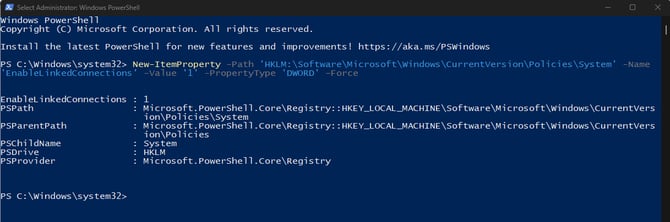
5. Restart Vertelith.
Network drives should now be accessible.